
Q.The combination of AZ Series EtherCAT compatible driver and OMRON Corporation PLC is controlled using the internal profile of the driver. What home-seeking modes are there in homing mode (HM)?
Target Products
AZ Series EtherCAT Compatible Driver:
AZD-AED, AZD-CED, AZD-KED, AZD2A-KED, AZD2B-KED, AZD3A-KED、AZD4A-KED, AZD-KRED
Control Methods: Use the Internal Profile of Driver (Operation mode PP, PV, HM mode)
Homing mode (HM) is a mode used in return-to-home such as profile position mode (PP).
Methods for return-to-home can be broadly categorized into the following two classifications. Which return-to-home mode to be used is set in the "Homing method Object (6098h)."
- *In cyclic synchronous position mode (CSP), use a function block such as MC commands to perform return-to-home operation in order to manage coordinates at a higher level.
- *The Homing method can also be set from MEXE02 (object in the profile area).
- *Wire the limit sensor and home sensor to the AZ driver.
Return-to-home operation of CiA402 driver profile
The following homing methods are supported by CiA402.
- Return-to-home by the home sensor (HOMES), starts in the positive direction (24) *default value
- Return-to-home by the home sensor (HOMES), starts in the negative direction (28)
- Return-to-home by the limit sensor (FW-LS/RV-LS), starts in the negative direction (17)
- Return-to-home by the limit sensor (FW-LS/RV-LS), starts in the positive direction (18)
- Home preset (35, 37) (35 and 37 have the same operation)
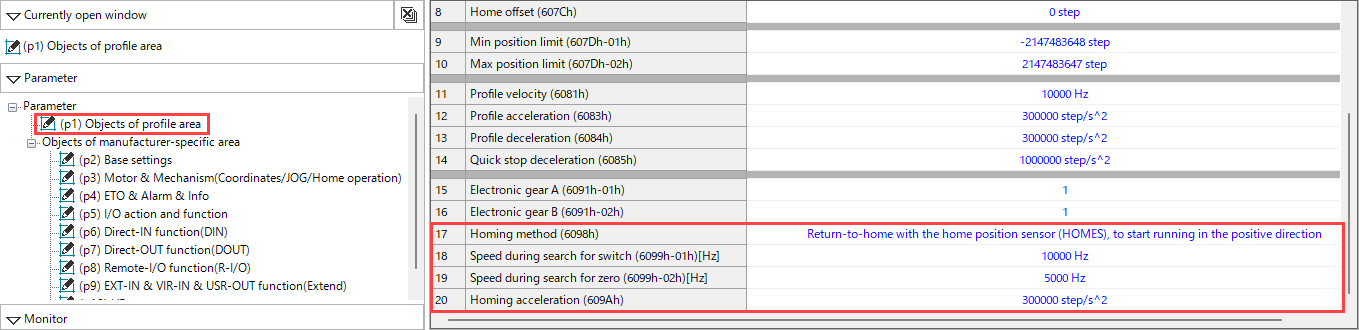
Return-to-home operation of Oriental Motor's specifications
When "Homing method (6098h)" is set to "-1," the homing mode of Oriental Motor's specifications is used. The homing method for Oriental Motor's specifications is as follows.
- 2-sensors (0)
- 3-sensors (1) *default value
- One-way rotation (2)
- Push-motion (3)
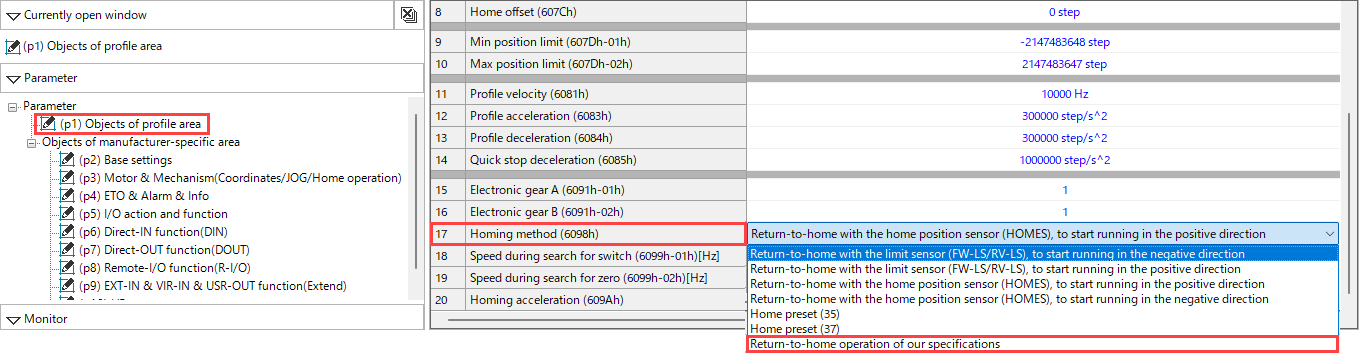
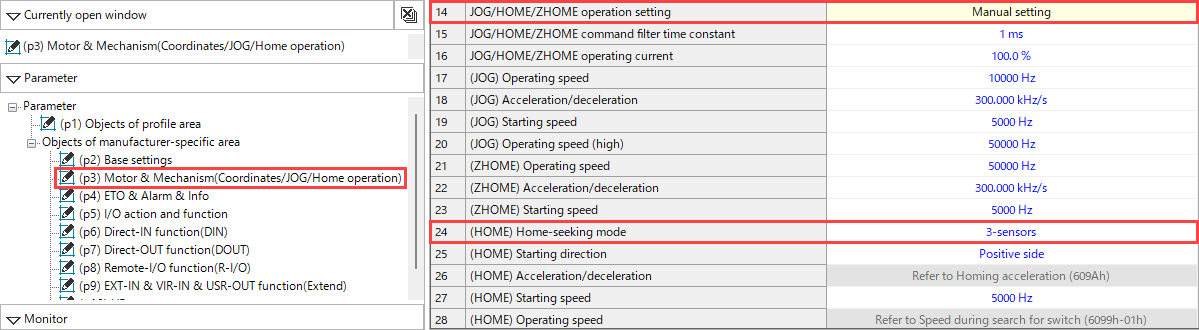
For the homing method of Oriental Motor's specifications, please configure settings in "(HOME) Home-seeking mode".
- *The homing method of Oriental Motor's specifications can also be set from the support software MEXE02.
Set "JOG/HOME/ZHOME operation setting (47F5h)" to "Manual setting."
Related Information: AZ Series EtherCAT Compatible Driver FAQ
Product Category: αSTEP, network compatible products and controllers, electric actuators
Model and Series: AZ Series, electric actuator AZ Series equipped
Description: How to Use/Setting Method
FAQ No.: 576
Related FAQs
After opening the email, we will check the contents and contact you. Please note that depending on your inquiry, we may call you back.